HTML snippet
The HTML snippet is a line of code to paste in the <head> of your site's pages. It loads the banner from the Avacy CDN.
Who it is for
It is for people who can edit the site's HTML, for example a hand-written site or one with an editable theme. Shopify, Magento and HubSpot have dedicated pages that use the same snippet.
The WordPress plugin and Google Tag Manager have their own installation, described in the guides Install the banner with the WordPress plugin (in Italian) and Install the banner with Google Tag Manager (in Italian).
Prerequisites
Before you start, you need:
- a web space in the Avacy dashboard, with the banner published via Save and publish Cookie Banner. The loader reads the configuration from a file that the dashboard writes on publish;
- access to the
<head>code of the site's pages.
Steps
-
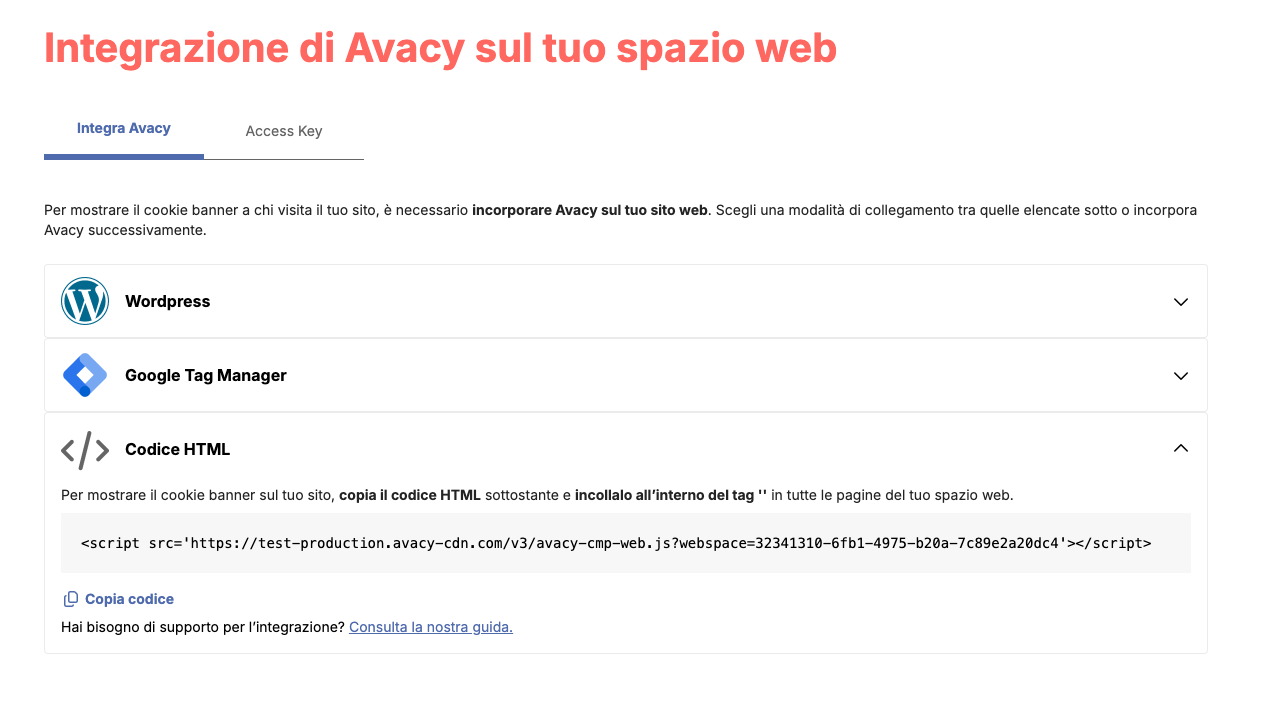
In the dashboard, open the web space's Cookie Banner page and press Integrate banner on your web space. Alternatively, open the web space settings and choose Avacy integration on your web space.
-
Open the Integrate Avacy tab, then the HTML code item.
-
Press Copy code. The dashboard copies a snippet like this one.
<script src='https://acme.avacy-cdn.com/v3/avacy-cmp-web.js?webspace=123e4567-e89b-12d3-a456-426614174000'></script>In the real snippet,
acmeis your Team name and the code afterwebspace=is your web space ID. Copy the snippet as it is. These example values appear throughout the documentation. -
Open the file that contains the pages'
<head>. With a theme or a template, open the<head>shared by all pages. -
Paste the snippet right after the opening
<head>tag.<head><script src='https://acme.avacy-cdn.com/v3/avacy-cmp-web.js?webspace=123e4567-e89b-12d3-a456-426614174000'></script><meta charset="utf-8"><!-- other site tags --></head> -
Save the file and publish the change on the site.
The banner starts on its own and needs no other code. The loader also works when inserted by Google Tag Manager.
Check
Open the site in a private window. The banner appears on the first visit. The full check is in Check that the banner works.
Where to put the snippet
The loader downloads the web space configuration and the banner code from its own address, then starts the banner. The CDN picks the loader version that fits the web space.
A <script> tag without async and without defer stops page parsing until the file has run. The loader runs these actions right away, before the tags that follow it:
- it sets Avacy's developer ID for Google with a
gtagcommand; - with Google Consent Mode, it writes the initial "denied" value of each consent type to the
dataLayer. The value must exist before a Google tag reads the consent state; - with IAB TCF, it installs the
__tcfapifunction, which the page's vendors can call right away.
This is why the snippet goes high up in the <head>, before Google tags and scripts that use TCF.
Everything else waits until the page has been parsed (DOMContentLoaded event). Only then does the loader download the configuration and the banner code. This way Firefox also applies the import map that some sites print after the snippet, for example WordPress with a block theme. If the loader arrives when the page has already been parsed, for example from Google Tag Manager, it starts right away.
Page with Google tags
Put the snippet before gtag.js and analytics.js. If a Google tag runs before the initial Consent Mode value, the banner writes a warning to the console, described in Google tag order and debug mode.
Page with Google Tag Manager and TCF
The snippet goes after Google Tag Manager. The TCF stub, a small script that installs __tcfapi, goes before Google Tag Manager.
<head>
  <!-- 1. TCF stub, synchronous -->
  <script src="https://acme.avacy-cdn.com/v3/tcf-stub.js"></script>

  <!-- 2. Google Tag Manager snippet -->

  <!-- 3. Avacy snippet -->
  <script src='https://acme.avacy-cdn.com/v3/avacy-cmp-web.js?webspace=123e4567-e89b-12d3-a456-426614174000'></script>
</head>
If __tcfapi already exists on the page, the snippet does not add its stub.
Page with the Avacy GTM template
The GTM template sets the initial Consent Mode value on its own. The loader detects it and skips its own value.
Domains to allow in the Content Security Policy
If the site uses a Content Security Policy (CSP), the CSP must allow these addresses. The "Directive" column shows the directive that governs each request.
| Address | What it is for | Directive |
|---|---|---|
https://<team>.avacy-cdn.com | Loader, banner code and banner add-ons (.js files). Not needed if script-src uses the nonce, see Script with nonce | script-src |
https://<team>.avacy-cdn.com | Web space configuration, translations of the languages the banner does not include | connect-src |
https://<team>.avacy-cdn.com | Banner images, such as the preferences icon | img-src |
https://assets.avacy-cdn.com | TCF vendor and Google vendor lists, only with those frameworks enabled | connect-src |
https://assets.avacy-cdn.com | Logo uploaded from the dashboard | img-src |
https://api.avacy.eu | Sending consents to the consent archive, only if automatic archiving is enabled | connect-src |
<team> is the Team name, the same one that appears in the snippet (acme in the examples).
Banner styles
The banner does not ask you to add 'unsafe-inline' to style-src. In current browsers the banner applies its own styles in a way that the CSP does not block.
Safari before version 16.4 does not support that method. There the banner adds a <style> element with the nonce of the snippet or of the <meta name="csp-nonce" content="…"> tag. So, with a strict style-src, put the nonce on the snippet as in Script with nonce, or add that <meta> tag.
If the CSP still blocks the styles, the banner shows nothing: no banner, no preferences icon, no preferences window. This keeps the page usable. Consent already saved and preemptive blocking keep working. The console shows the warning "The banner styles were blocked by the Content-Security-Policy…" with the fix to apply.
Example of a CSP without nonce that works with the banner, even with TCF enabled (acme is the Team name). If you use automatic consent archiving, add https://api.avacy.eu to connect-src.
default-src 'self';
script-src 'self' https://acme.avacy-cdn.com;
connect-src 'self' https://acme.avacy-cdn.com https://assets.avacy-cdn.com;
img-src 'self' https://acme.avacy-cdn.com https://assets.avacy-cdn.com data:;
style-src 'self'
Script with nonce
If script-src only accepts scripts with a nonce, put the same nonce on the snippet. The banner uses that nonce to load its own code and the add-ons. In this case the CDN address is not needed in script-src.
<script nonce="R4nd0m" src='https://acme.avacy-cdn.com/v3/avacy-cmp-web.js?webspace=123e4567-e89b-12d3-a456-426614174000'></script>
We recommend adding 'strict-dynamic': the browser automatically allows scripts loaded by a script with the nonce.
script-src 'nonce-R4nd0m' 'strict-dynamic'
Preemptive blocking unblocks scripts after consent and keeps their nonce. Scripts marked for preemptive blocking must therefore have the site's nonce. Without a nonce, the CSP blocks the script even after consent.
Common problems
| Symptom | Likely cause | What to do |
|---|---|---|
| The banner does not appear | The web space has no published banner, or the snippet uses a wrong code | Check the console as in Check that the banner works |
| The warning "Google tags ran before…" appears in the console | A Google tag runs before the snippet | Move the snippet above the Google tags |
| The banner appears only on some pages | The snippet is in a file that not all pages use | Paste the snippet in the shared <head> file |
The console shows network errors towards avacy-cdn.com | The site's CSP blocks the address | Allow the addresses in the table |
With TCF the banner appears, but "Accept cookies" does not save the choice and the preferences are empty. The console shows The site's Content Security Policy blocks https://assets.avacy-cdn.com… | The CSP blocks the TCF vendor list | Add https://assets.avacy-cdn.com to connect-src |
| The banner does not appear and the console shows "The banner styles were blocked by the Content-Security-Policy…" | The CSP blocks the banner styles, usually on Safari before 16.4 | Put the nonce on the snippet or in the <meta name="csp-nonce"> tag, as in Banner styles |
With script-src 'nonce-…' the banner does not appear | The snippet has no nonce | Add the site's nonce to the snippet, as in Script with nonce |
With script-src 'nonce-…' a marked script stays blocked after consent | The marked script has no nonce | Add the site's nonce to the script tag |
| The consent archive does not receive the banner's consents, even though the visitor makes a choice | The CSP blocks sending to api.avacy.eu. The banner saves the choice in the browser and shows no errors. The browser console shows a Content Security Policy error | Add https://api.avacy.eu to connect-src |
Last updated: 10/11/2026.